



 Integrationsmonday.com
The monday.com business card scanner for events
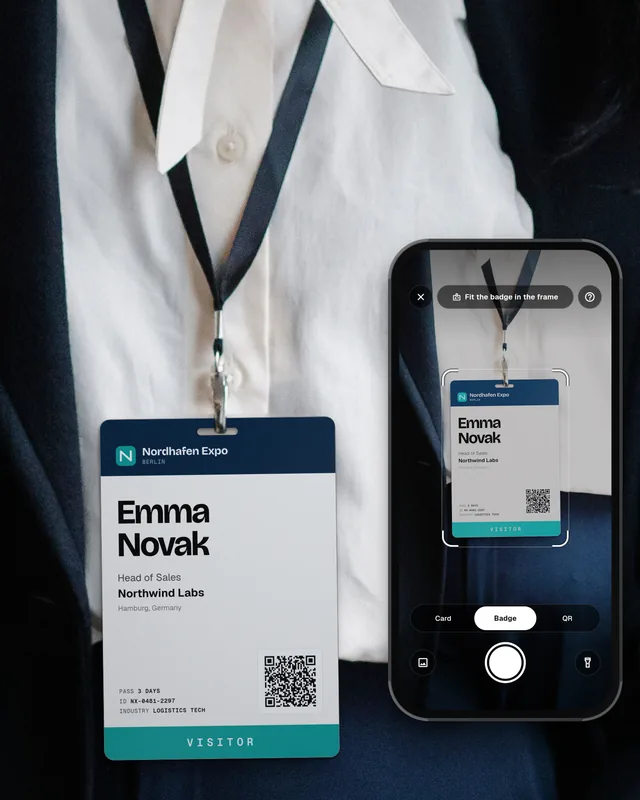
Connect monday.com once in the Swopi dashboard and pick the board your leads should go to. Then scan a business card, an event badge or a QR code with the Swopi app, and the lead appears as an item on your board in seconds, in the columns you mapped. With Event Intelligence or Event Lead Capture, Swopi AI also adds verified email, phone and company data.
The Swopi app is free on iPhone and Android. Connecting monday.com needs a paid Swopi plan.


DAY PASS
DAY PASS
DAY PASS
DAY PASS
DAY PASS
DAY PASS
DAY PASS
DAY PASS
 in/jonas-lindqvistSaved to monday.com
Teams at these companies use Swopi.


What lands in monday.com
Every scan becomes an item on the monday.com board you pick, in that board's own columns. Swopi suggests the mapping from the column types, and you can change it at any time.
Saved to monday.com- Swopi
- monday.com
- Full name
- Item name
- Business email
- Email column
- Direct phone
- Phone column
- Company website
- Link column
- Company name
- Text column, such as Company or Account
- Job title
- Text column, such as Title or Role
- Notes
- Long text column
- Your own columns
- Any column on the board you map
How to connect monday.com
- 1
Connect monday.com
In the Swopi dashboard, open Integrations and click Connect monday.com. You sign in to monday.com and allow access. No API token to copy.
- 2
Pick a board
Choose the board for your leads, such as your monday CRM Leads or Contacts board, or any board of your own. No leads board yet? Swopi can create a Swopi Leads board with the right columns.
- 3
Check the column mapping
Swopi suggests which field goes to which column, based on the column types. Create a test lead to see it land, then turn on automatic sync.
- 4
Scan at the event
Scan badges, paper cards in any language and QR codes with the Swopi app on iPhone or Android. You do not need the organizer's rented scanner.
- 5
Work the lead in monday.com
The item is on your board in seconds. With Event Intelligence or Event Lead Capture, Swopi AI adds verified business email, direct phone and company data from 20+ sources and drafts the follow-up email.
Swopi AI
Swopi AI completes every lead before it reaches monday.com
A badge or a card often has only a name and a company. Swopi AI finds the rest in seconds, shows where each detail came from, and never overwrites what your team typed.
- Work email
- Direct phone
- Job title, seniority and LinkedIn
- Company website, industry, size and address
What monday.com does on its own
monday CRM works on iOS and Android through the monday.com mobile app, with the Leads, Deals, Accounts and Contacts boards on the go (monday.com support). In monday.com, contacts and leads are items on boards, not a separate contact object. The monday.com support page does not describe a built-in scanner for business cards or event badges, or adding data from outside sources.
Why teams add Swopi
- Badges, cards and QR codes: scan any of them at the booth, with no rented scanner from the organizer.
- Items arrive complete: with Event Intelligence or Event Lead Capture, Swopi AI adds verified email, direct phone and company details before the item reaches your board.
- No duplicates: Swopi checks the email column and updates the existing item instead of adding a second one.
- Only what it needs: Swopi asks monday.com for two permissions, reading boards and their columns, and creating and updating items. It never deletes anything on the board.
Swopi and monday.com: questions
Does monday.com have a business card scanner?
monday.com's support pages do not describe a built-in card scanner. With Swopi, you scan the card with your phone and the contact becomes an item on your monday.com board.
Which monday.com boards can Swopi write to?
Any board you can write to: the monday CRM Leads or Contacts board, or a board of your own. You pick the board when you connect, and you can change it at any time.
Will Swopi create duplicates in monday.com?
No, as long as the board has an email column you mapped. Swopi finds the existing item by email and updates it.
Can I send leads to monday.com by hand?
Yes. Turn off automatic sync and send the contacts you choose from the Swopi dashboard.
Which Swopi plan do I need for monday.com?
Any paid plan: Pro, Event Intelligence, Teams or Event Lead Capture. On Teams, the admin connects the company board. The free plan does not include CRM connections. See pricing.
What data does Swopi AI add?
With Event Intelligence or Event Lead Capture: verified business email, direct phone, job title, seniority and LinkedIn, plus company data like website, industry, size and country. Read more about AI enrichment.
 HubSpot
 Salesforce
 Zoho CRM
 Microsoft Dynamics 365
 Pipedrive
 Outlook