


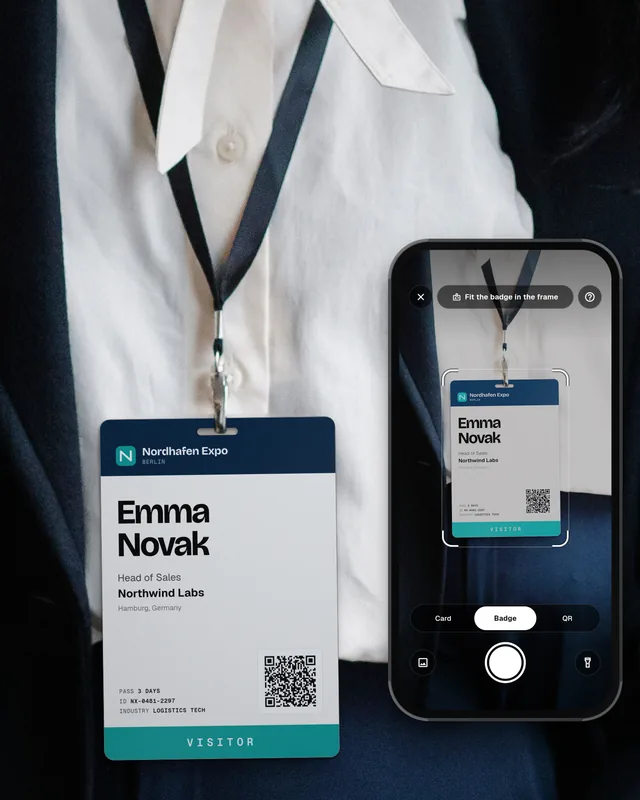

Exhibition lead capture, on the phones your stand team already has.
Scan every visitor badge, business card and LinkedIn QR code at the exhibition. Swopi AI adds the missing email, phone and company data, and each lead lands in your CRM before the stand is packed away.
Available on Event Lead Capture.
Any exhibition badge, no rented scanner.
Swopi reads the name and company printed on the badge, plus its QR code when it is open. It works the same at ExCeL London, the NEC or a hotel ballroom, so your team learns one app for every show.
Every lead complete before you leave the hall.
A badge often has only a name and a company. Swopi AI adds the verified work email, direct phone, job title and company facts, and marks every value it filled.
- Name
- Priya Nair
- Company
- Helix Medical
- Title
- VP Procurement
- p.nair@helix-medical.eu
- Phone
- +31 20 555 0192
- in/priyanair
- Company
- Medical devices · 800 employees · NL
- Intent
- High · 88
The stand manager sees the whole team, live.
Event Mode shows every lead as it comes in, per person, hot leads first. You know how the exhibition is going while it is still going.
- Mia Keller31
- Jonas Olsen24
- Sofia Petrova19
- Tomas Brand12
- Alex RiveraNorthwind Logistics · 2 min ago92
- Priya NairHelix Medical · 6 min ago88
- Lukas WeberBauer Automotive · 11 min ago71
- Elena RossiRossi & Partners · 14 min ago44
Leads go straight to your CRM.
HubSpot, Salesforce, Microsoft Dynamics 365, Zoho CRM, Pipedrive and monday.com, in native fields and tagged with the exhibition. Zapier connects 5,000+ other apps.
- Name
- Priya Nair
- Company
- Helix Medical
- Title
- VP Procurement
- p.nair@helix-medical.eu
- Phone
- +31 20 555 0192
- Source
- Logistics Expo · Badge
- Intent
- High · 88
- Owner
- Sofia Petrova
Thanks for stopping by our booth. You asked about badge scanning for the Munich show, so here is a short overview and a link to pick a time.
The follow-up is written for you.
Swopi AI drafts a personal email for every lead from your notes, the company and the event. Read it, send it, move on to the next visitor.
Exhibition lead capture: common questions
What is an exhibition lead capture app?
An app your stand team uses to capture visitors as leads: scan the badge or business card, add a note, and the contact goes to your CRM. Swopi runs on your team's own iPhones and Android phones.
Do we need the organizer's lead retrieval?
No. Swopi reads the name and company printed on any badge, so you do not need the organizer's app or a rented device. Some teams still use the official tool where the badge code is locked, and Swopi for everything else.
Can the whole stand team scan at the same time?
Yes. Everyone scans with the Swopi app on their own phone. Event Lead Capture is one company license with unlimited users and scans, so temporary staff can join for the show.
Which CRMs does it work with?
HubSpot, Salesforce, Microsoft Dynamics 365, Zoho CRM, Pipedrive and monday.com natively, plus Outlook and Slack. Zapier connects 5,000+ other apps.
What does it cost?
Individuals start free in the Swopi app. Stand teams use Event Lead Capture, one license for the whole company. Request a quote on the pricing page.
Try it at your next event.
Set up takes two minutes. Your first scan takes two seconds.